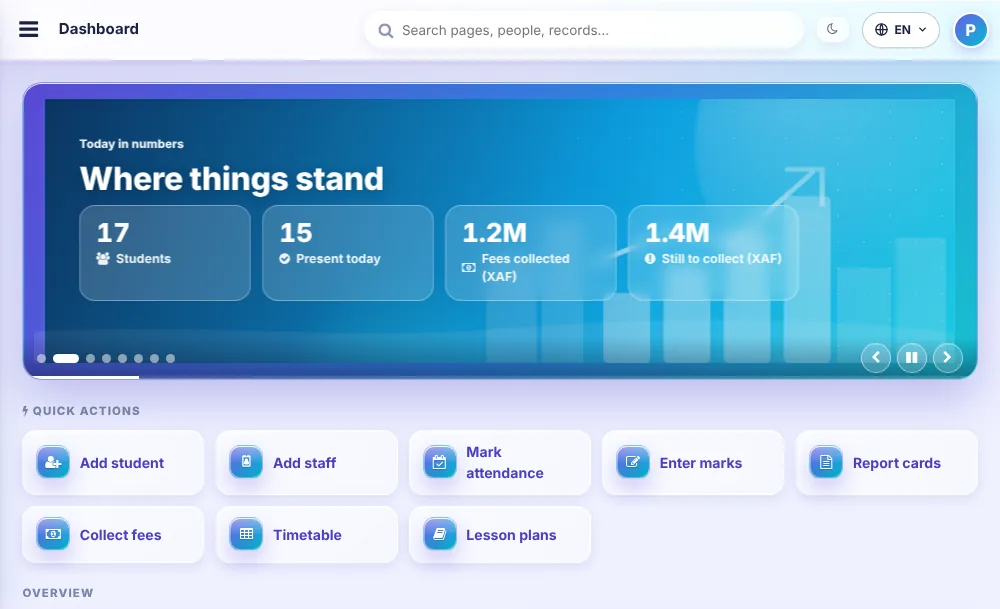
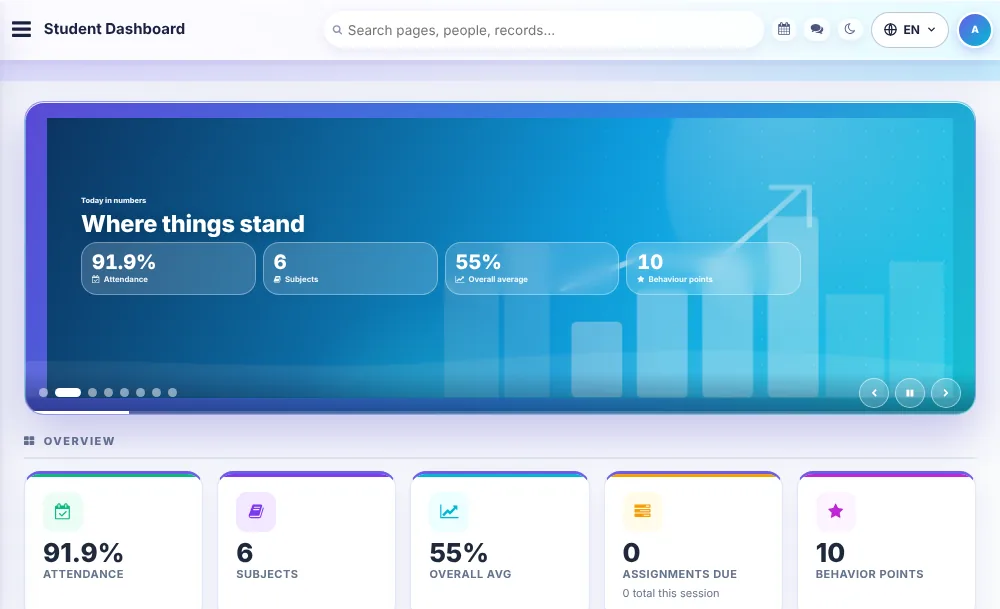
Ɗalibai, halarta, sakamako da kuɗin makaranta a allo ɗaya kai tsaye, don ka daina bin takardun rahoto.
Bayanan ɗalibai
Kowane ɗalibi a rikodi ɗaya da za a iya bincika, tare da shigo da bayanai daga takardar lissafi, fitarwa da katin shaida da za a iya bugawa.
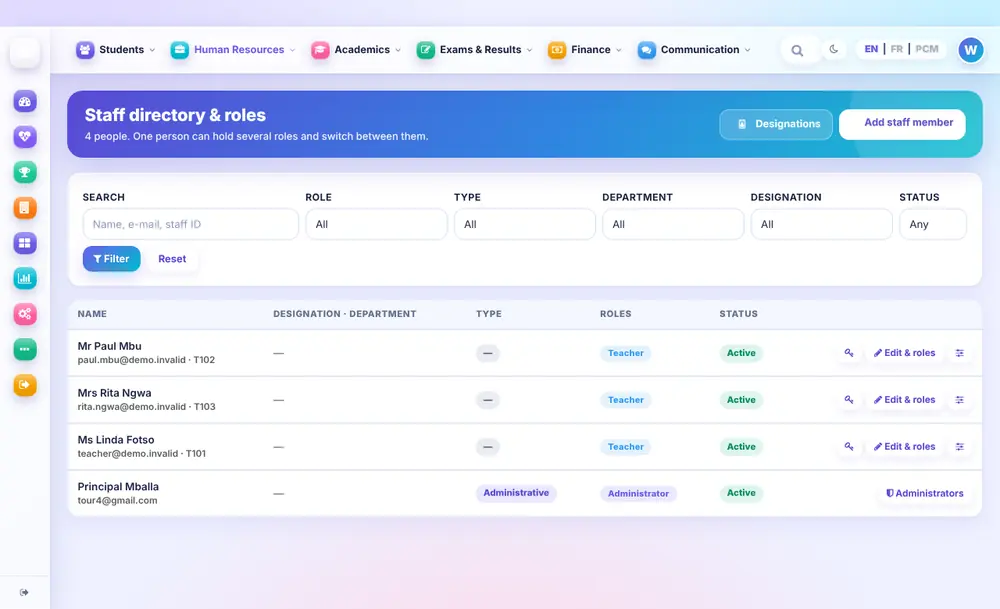
Ma'aikata da matsayi
Jerin sunaye ɗaya na malamai da ma'aikatan ofis. Mutum zai iya riƙe matsayi da yawa ya sauya tsakaninsu.
Ma'aikata, hutu da albashi
Neman hutu, takardar albashi, kwangila da guraben aiki a wuri ɗaya maimakon littattafai da yawa.
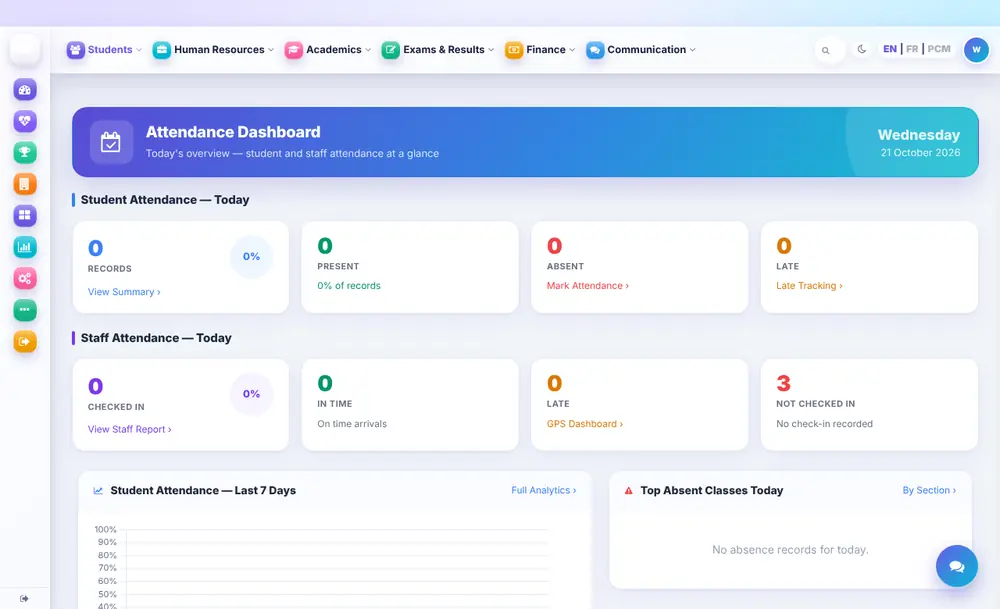
Halarta
Halartar ɗalibai da ma'aikata kowace rana tare da taƙaitaccen bayani kai tsaye, domin a lura da rashin zuwa a ranar.
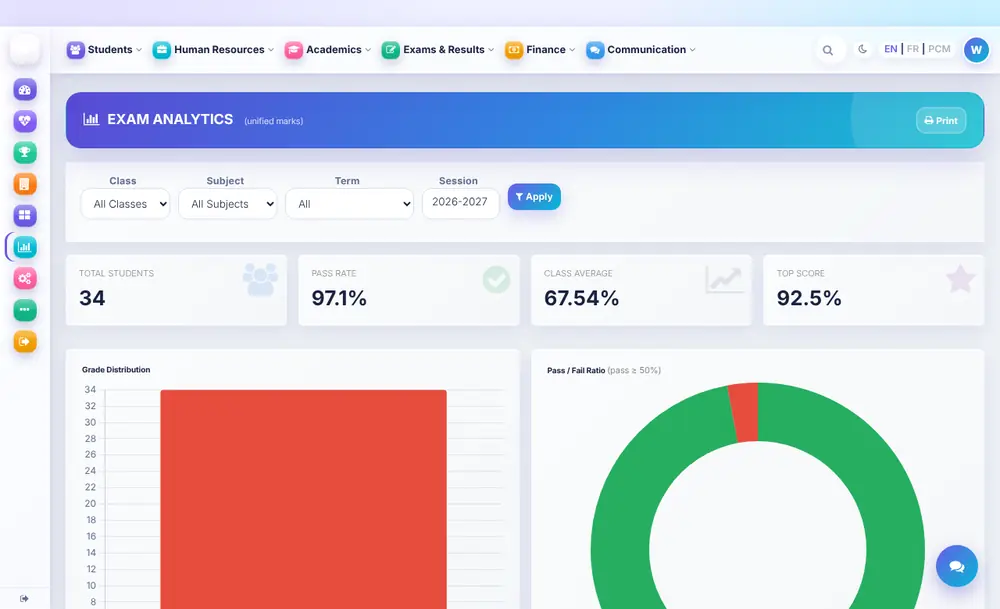
Sakamako da bincike
Adadin masu cin jarrabawa, matsakaicin maki na aji da rarraba maki ta aji da darasi, kai tsaye daga makin da malamai suke shigarwa.
Saƙonnin iyaye da aka duba
Saƙonni zuwa ga iyaye suna wucewa ta matakin amincewa kafin a aika, don haka babu abin da ke fita daga makaranta ba tare da dubawa ba.
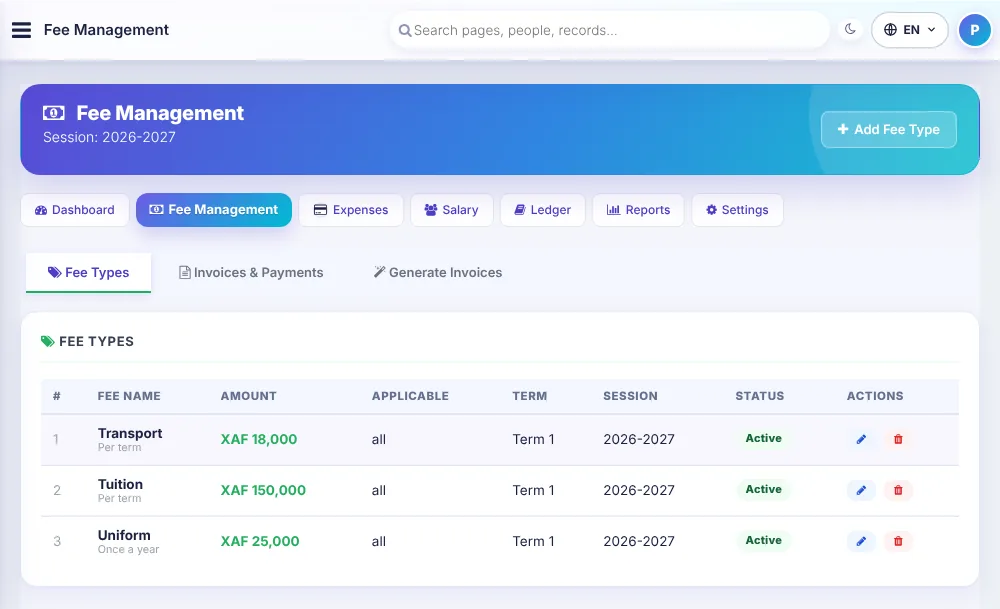
Kuɗin makaranta da nau'ikansu
Saita kuɗin karatu, sufuri da kayan makaranta ga kowane zango, sannan ka bi abin da aka biya da wanda ake bi.
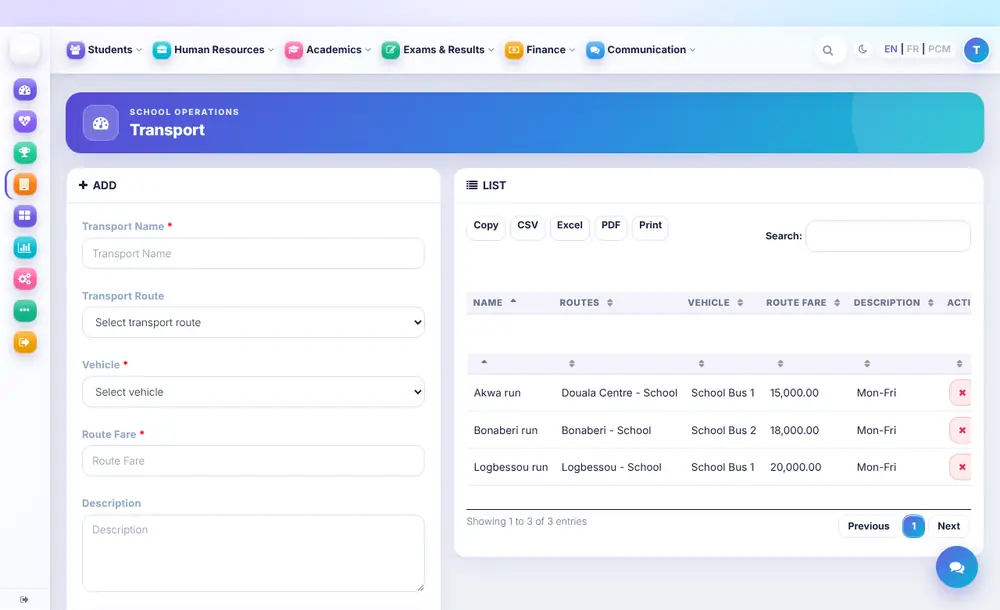
Sufurin makaranta
Hanyoyi, motocin bas da direbobi tare da kowane tafiya da kuɗin hawansa a jeri ɗaya.
Gidan kwanan ɗalibai
Gine-ginen kwanan ɗalibai, ɗakuna, gadaje da kuɗin kowane gado, a shirye don ɗaliban kwana.
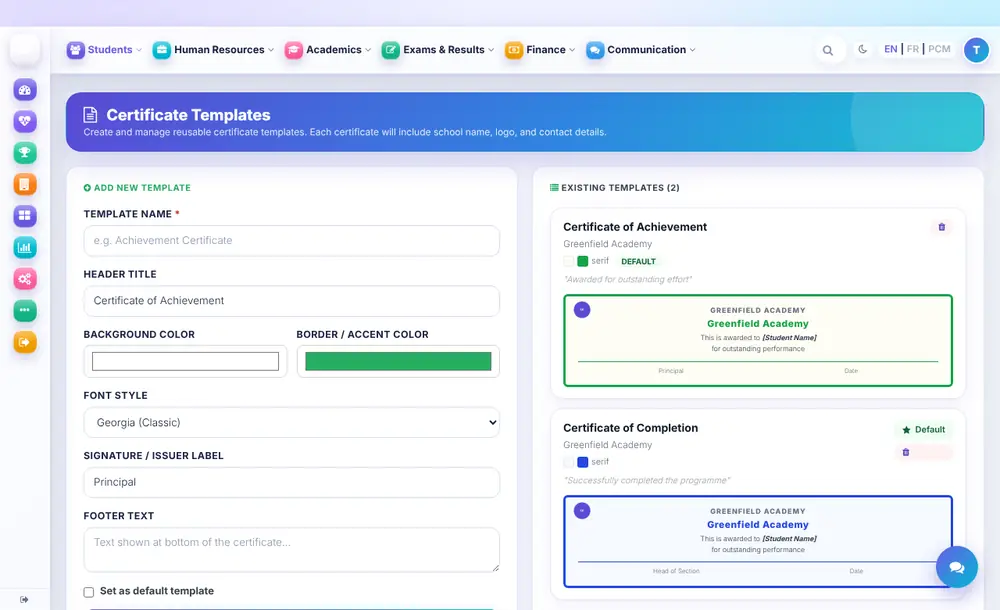
Takardun shaida
Ƙera takardar shaida sau ɗaya da sunan makarantarka da launukanta, sannan ka buga ta ga kowane ɗalibi.
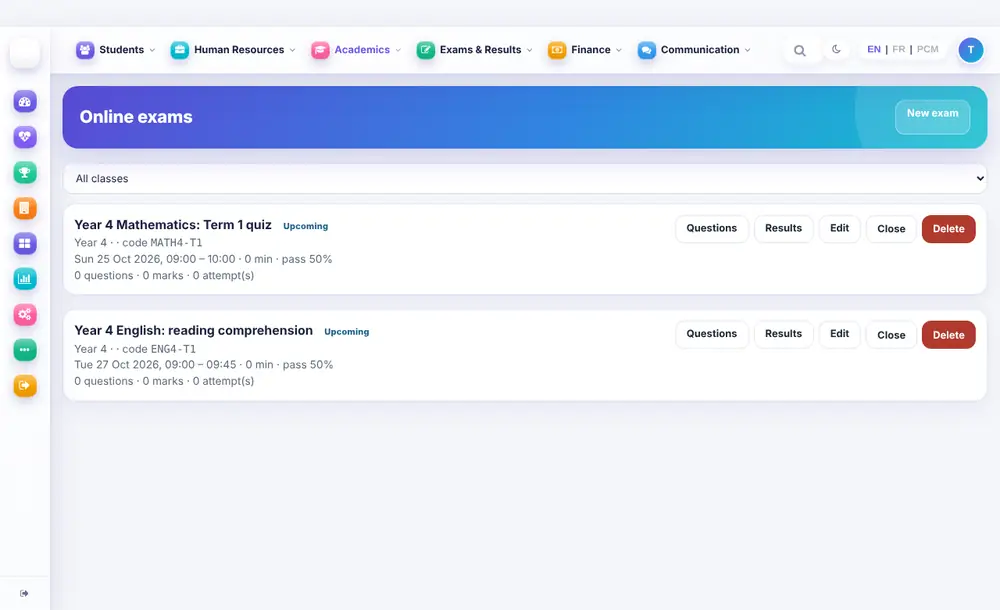
Jarrabawa ta intanet
Jarrabawar zaɓi-zaɓi mai lokaci bisa aji da darasi, tare da bin diddigin sakamako da makin cin jarrabawa a gare ka.
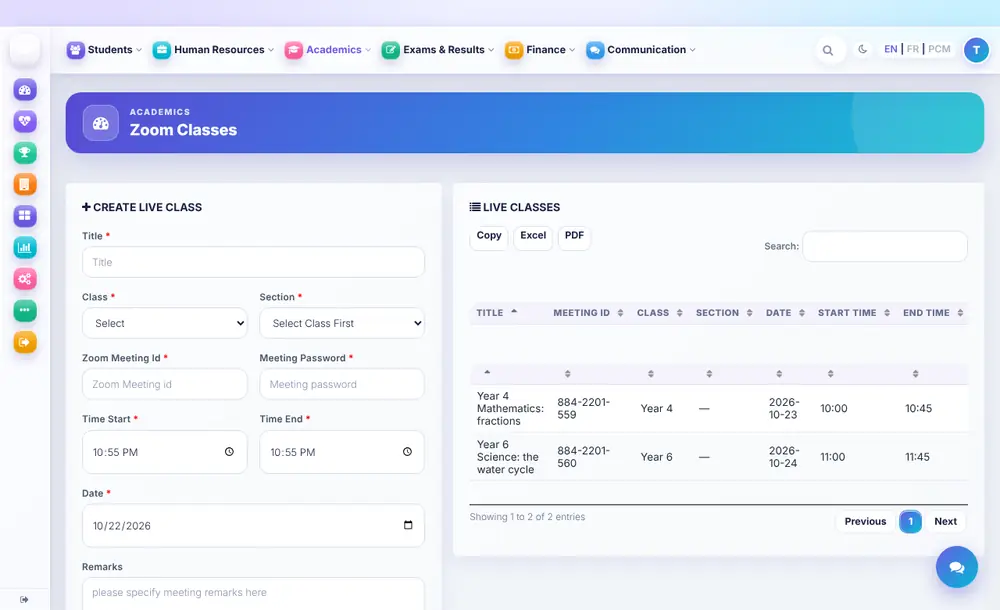
Darussa kai tsaye
Shirya darussa ta intanet tare da mahaɗin taro da kalmar sirri a wuri ɗaya don ɗalibai da iyaye.
Masu kawo kaya da kaya
Ajiye bayanan masu kawo kaya da abin da kowanne ke bayarwa, domin sake yin oda ya zama kira ɗaya.
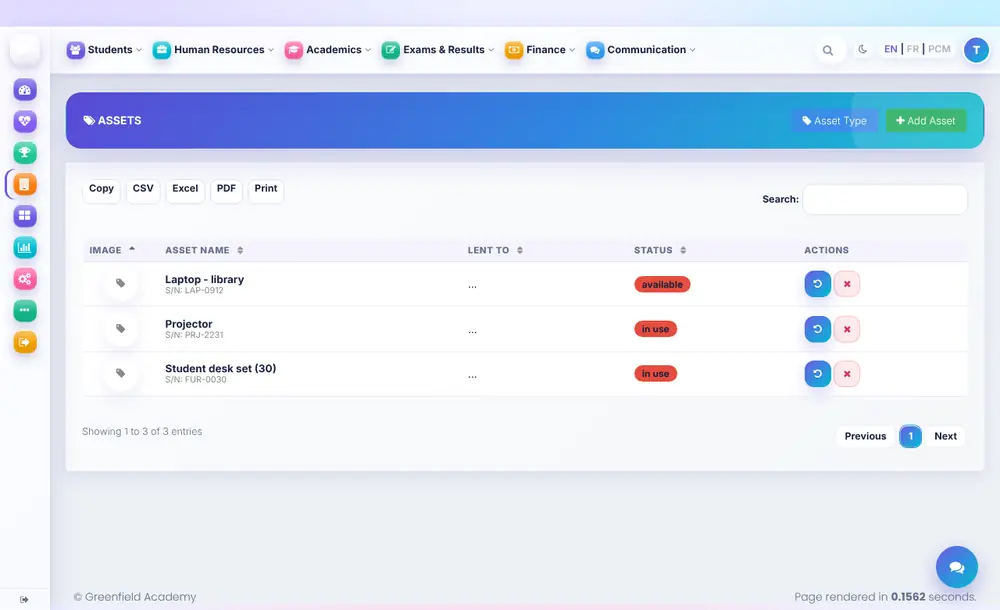
Kadarorin makaranta
Kayan daki da kayan aiki tare da lambar jeri, yanayi da wanda ke riƙe da su.
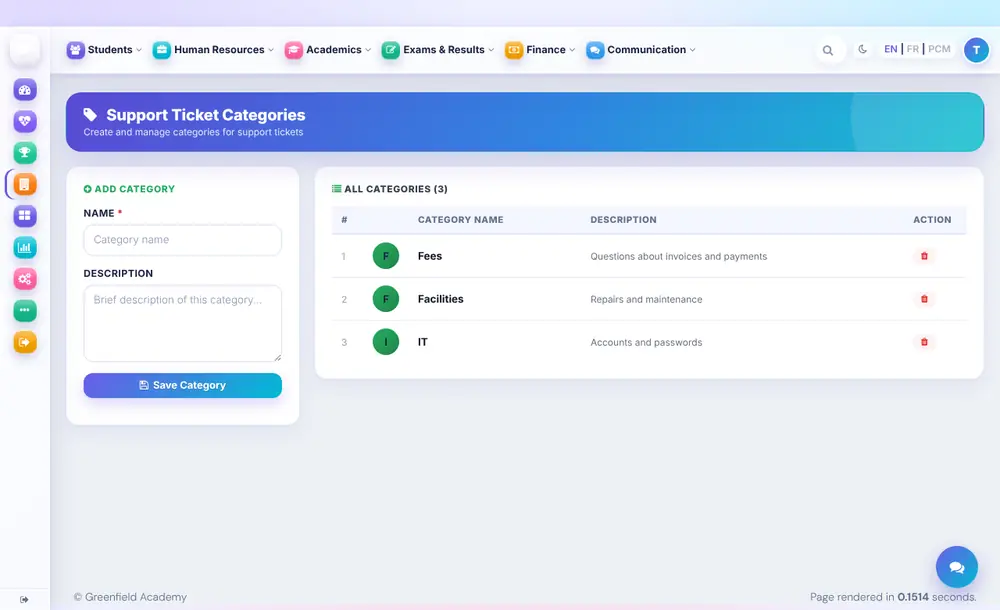
Tikitin tallafi
Iyaye da ma'aikata suna aika buƙata ƙarƙashin wani rukuni su bi ta har sai an warware ta.
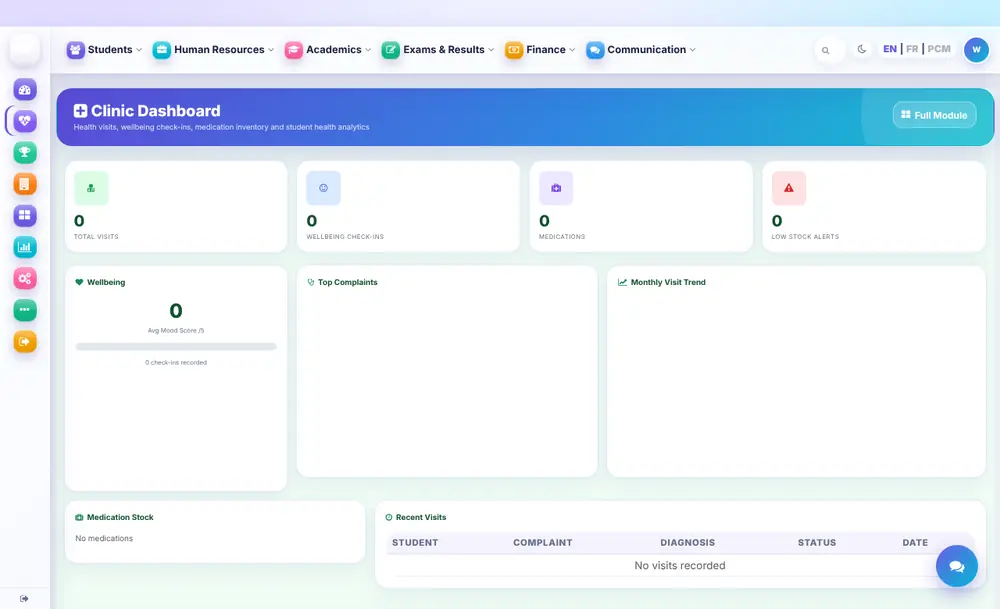
Asibitin makaranta
Bayanan lafiya, ziyara da magani a tare kuma a asirce.
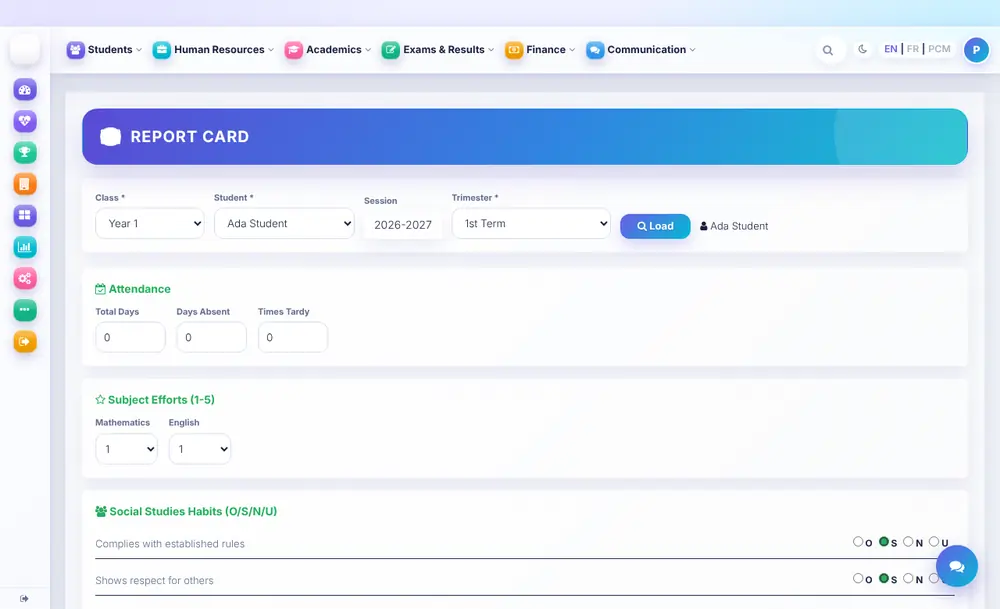
Katunan sakamako
Cika halarta, makin ƙoƙari da ɗabi'a na kowane ɗalibi a shafi ɗaya, a shirye don katin sakamako.
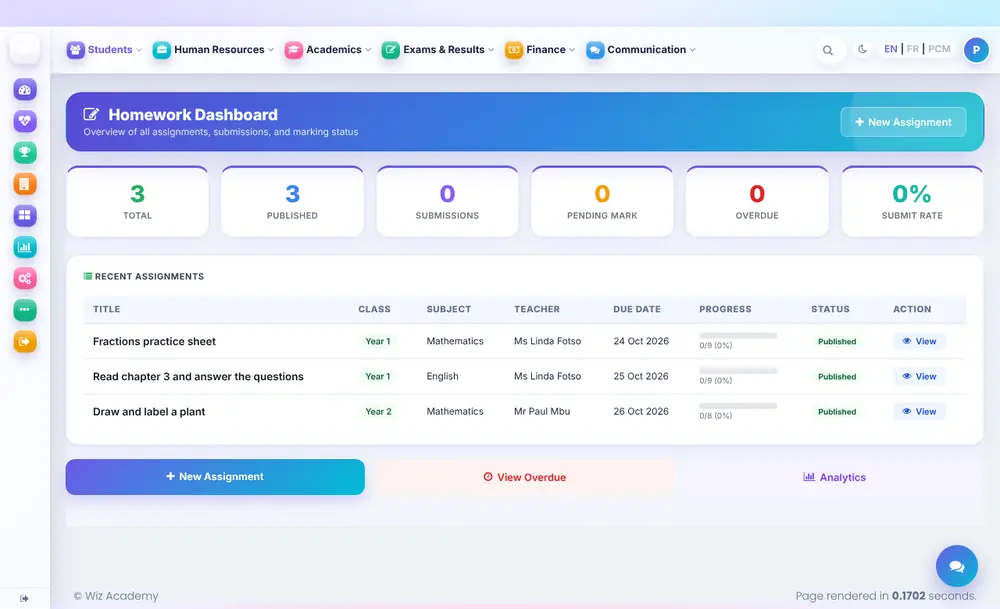
Aikin gida
Ba da aikin gida bisa aji da darasi, sannan ka bi diddigin abin da aka miƙa, aikin da ya ƙure lokaci da yawan miƙawa a allo ɗaya.
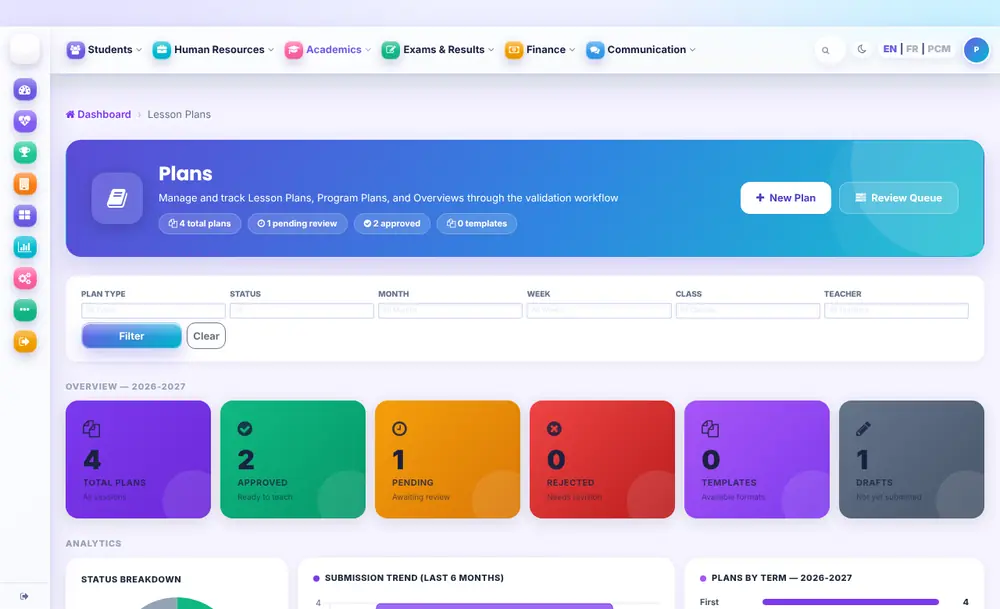
Shirin darasi
Malamai suna miƙa shirin darasi wanda ke wucewa ta dubawa zuwa amincewa, tare da bayyananniyar matsayi ga kowanne.
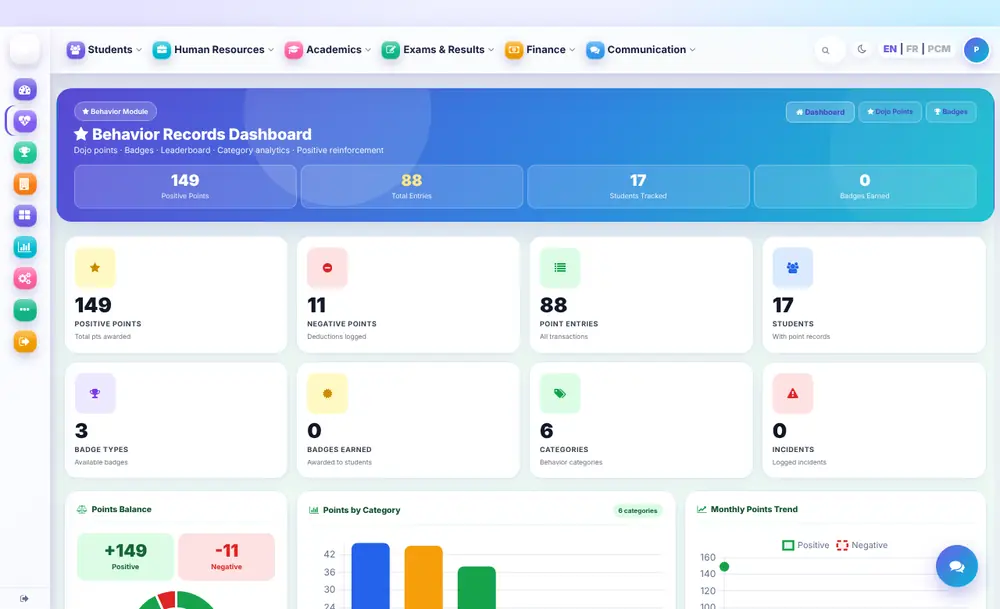
Rikodin ɗabi'a
Saka wa kyakkyawar ɗabi'a da maki da lambobin yabo, rubuta abubuwan da suka faru ka ga yanayin a makarantar gaba ɗaya.
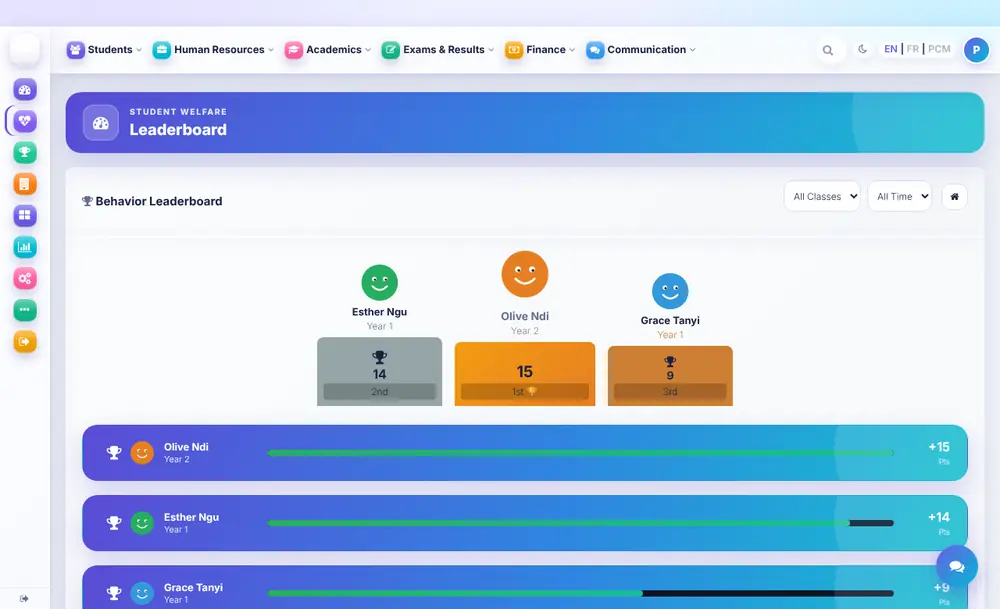
Jadawalin matsayin aji
Jadawalin matsayi mai daɗi na kowane aji wanda ke ƙarfafa gwiwar ɗalibai.
Ɗakin karatu na dijital
Kundin littattafai, bidiyo da shafukan intanet masu matakan karatu, ana raba su ta hanyar mahaɗi domin kada a adana nauyi a tsarin makaranta.
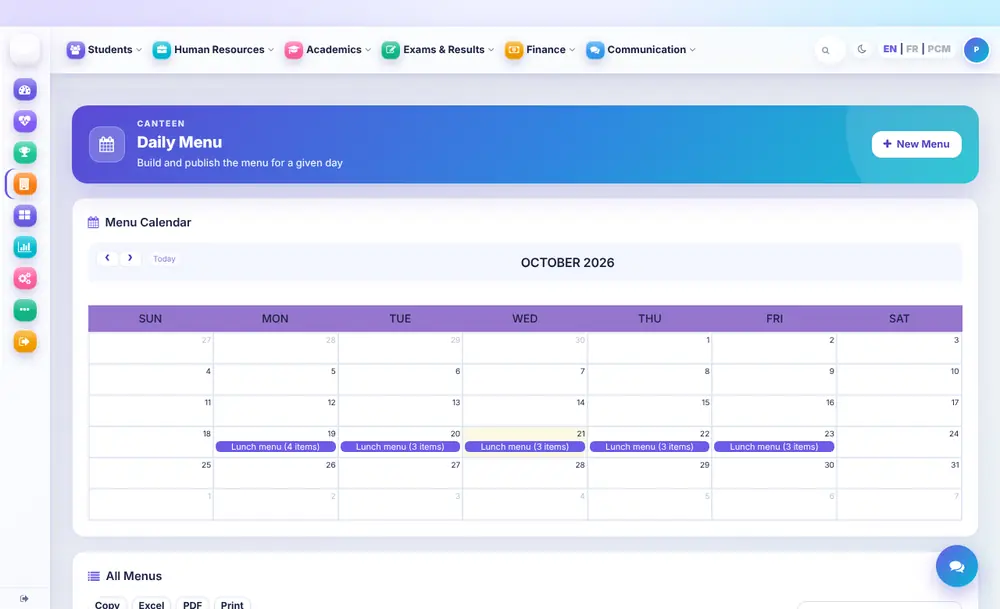
Jerin abincin gidan abinci na makaranta
Buga jerin abincin gidan abinci na kowace rana a kalanda, ka sarrafa kayayyaki, farashi da adadin da ya rage.
Jadawalin darussa ba tare da karo ba
Shirya ka buga jadawalin darussa na mako tare da lokutan darasi, ɗakuna da malamai, kuma ka gano karo kafin zangon karatu ya fara.
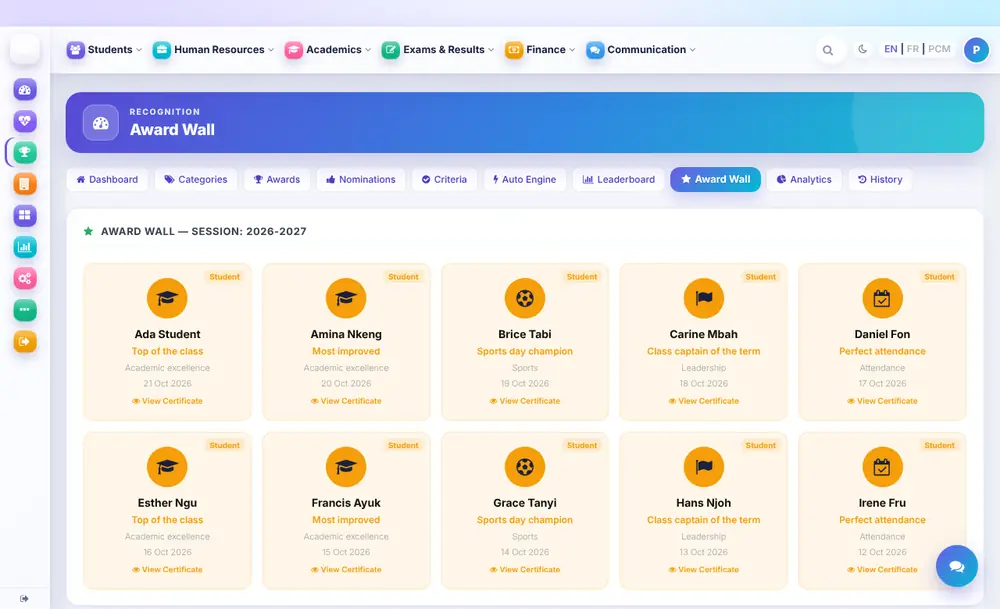
Kyaututtuka da takardun shaida
Karrama nasara da rukunan kyaututtuka, bangon kyaututtuka da takardar shaida ga kowane wanda ya ci.
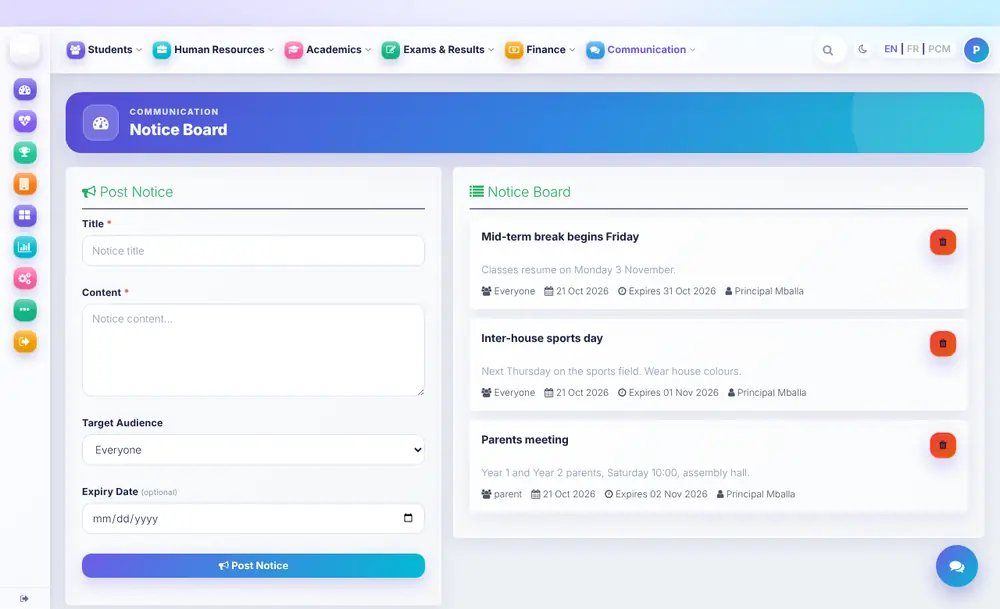
Allon sanarwa
Sanya sanarwa ga kowa ko iyaye kawai, tare da ranar ƙarewa domin tsofaffin labarai su ɓace da kansu.
Malamai
Ranarka a taƙaice
Azuzuwanka, ɗalibai, darussa da halartar yau a shafi ɗaya, tare da gajerun hanyoyi zuwa abin da kake yi mafi yawa.
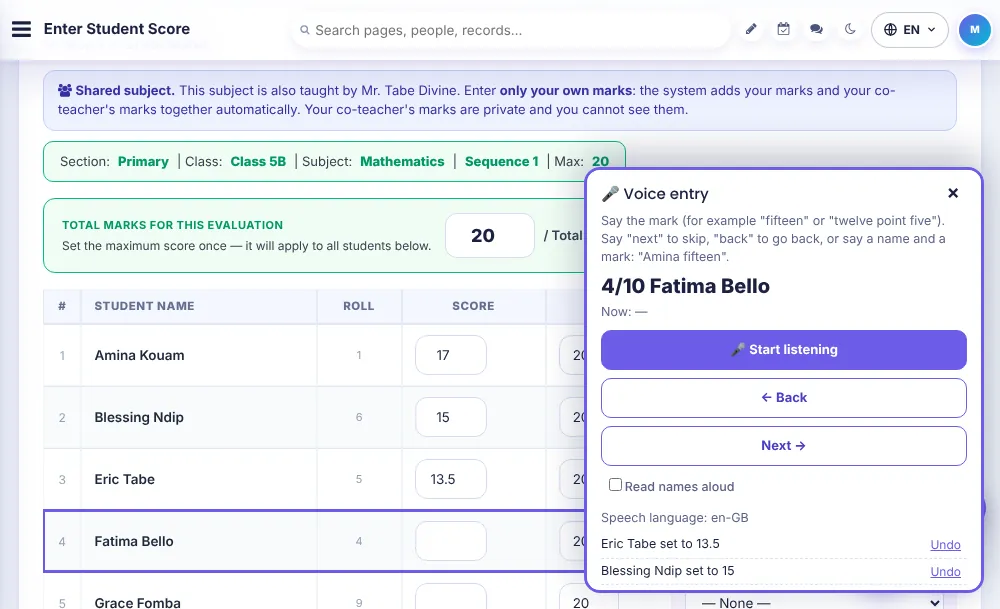
Shigar da maki
Saisissez les notes pas à pas pour votre classe, votre matière et votre évaluation, au clavier ou à la voix. La page indique quand elle est prête pour une connexion faible.
Dites-le au lieu de le taper
Touchez le micro et dites chaque note ou statut de présence. Il comprend l’anglais, le français et le pidgin, n’enregistre ni ne conserve jamais votre voix, et vous vérifiez tout avant d’enregistrer.
Deux enseignants, une matière
Quand une matière a un co-enseignant, chacun saisit ses notes de son côté et le système les additionne. Les notes de chacun restent privées, sauf pour le chef de département et le professeur principal.
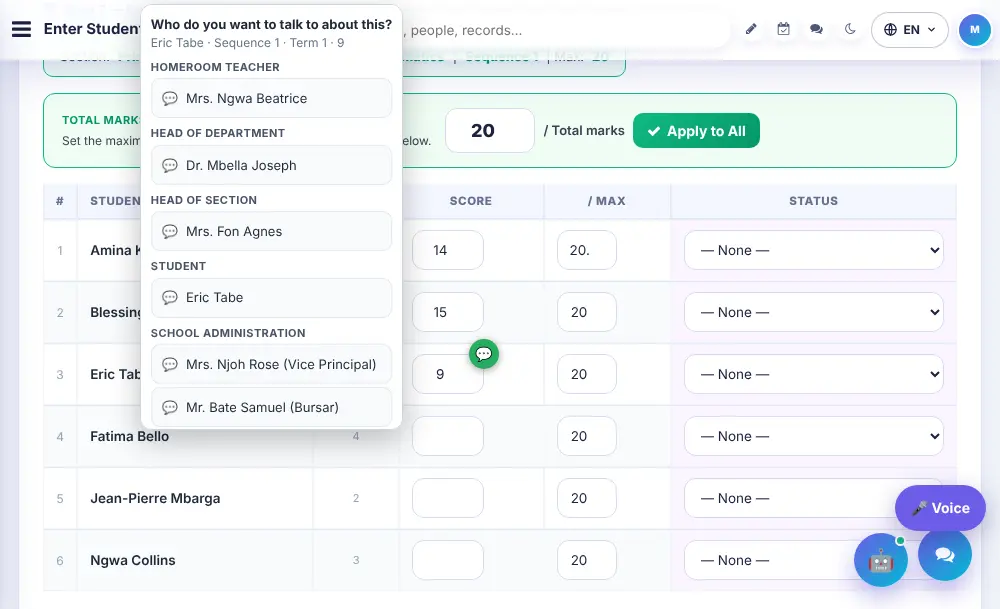
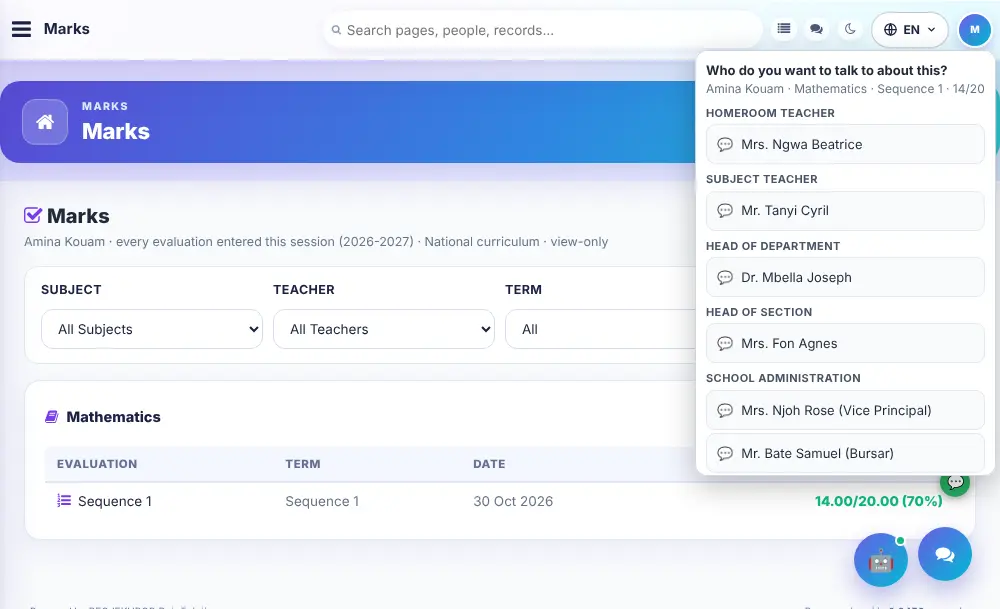
Discuter d’une note
Touchez une note ou une présence pour ouvrir une discussion à son sujet : titulaire, chef de département, chef de section, administration, parent, élève, mentor ou assistant IA. La valeur accompagne le message.
Halartar aji
Faites l’appel de votre classe principale ou de vos classes de matière en quelques touches depuis un téléphone, ou dites simplement présent, absent ou en retard.
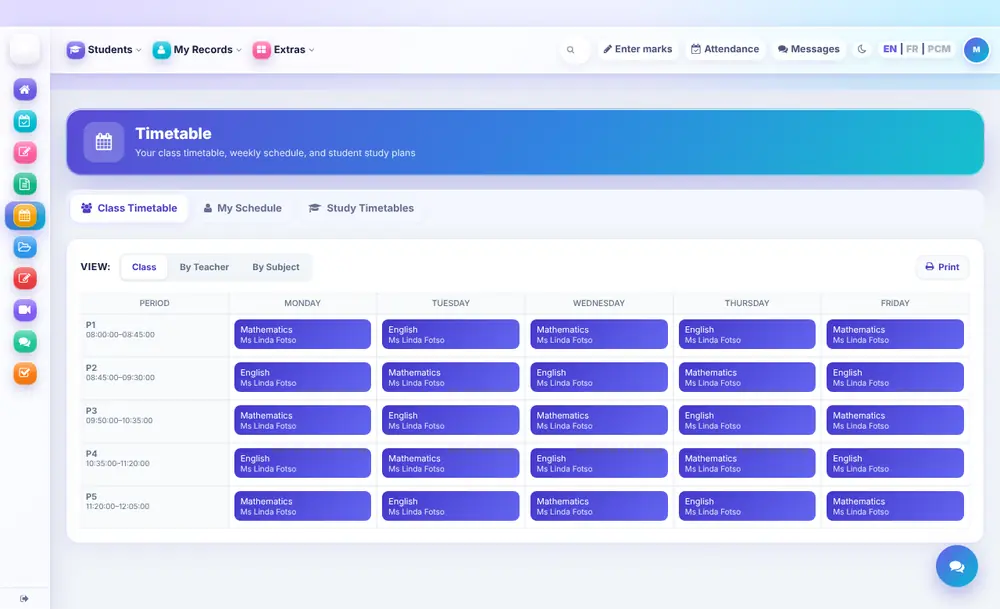
Jadawalin darussanka
Makonka a taƙaice: aji, darasi da ɗaki na kowane lokacin darasi.
Shirin darasi
Rubuta shirin darasi ka bi matsayin amincewarsa daga shafinka.
Iyaye
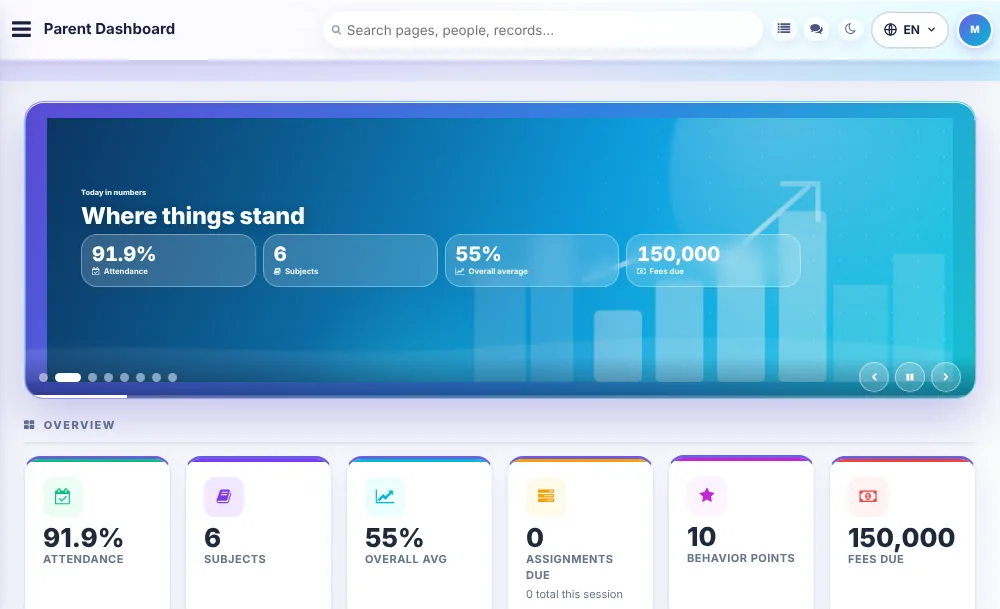
Ɗanka a taƙaice
Halarta, darussa, matsakaicin maki da kuɗin da ake bi, da zarar ka shiga.
Maki, darasi bayan darasi
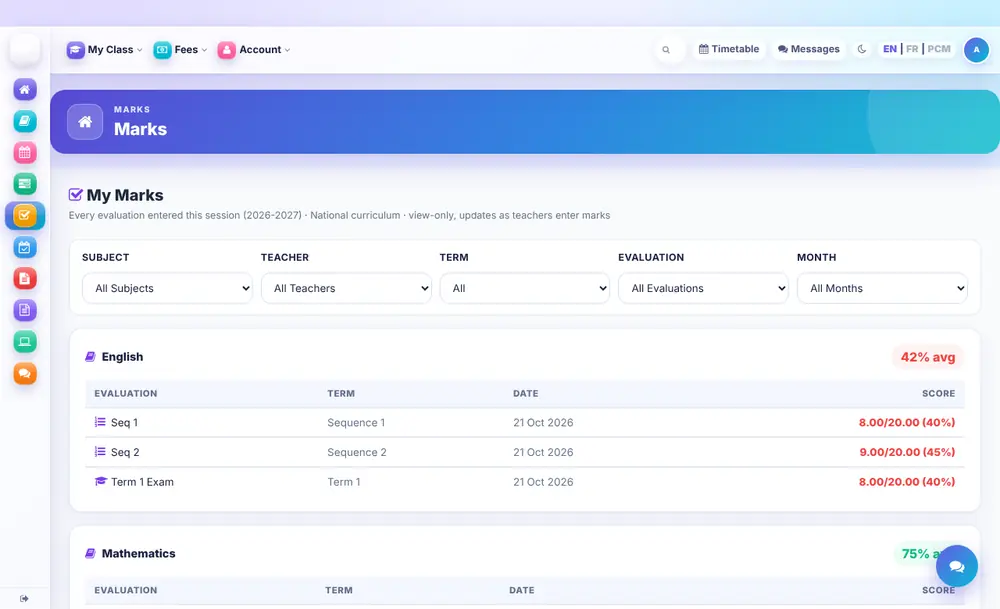
Kowace jarrabawa da maki yadda malamai suke shigar da su, saboda kada a samu mamaki a lokacin katin sakamako.
Poser une question sur une note
Touchez une note, un jour de présence ou une matière pour interroger l’école. La discussion s’ouvre avec cette valeur jointe, personne n’a à préciser laquelle.
Halarta
Bayyanannen rikodin kowace rana da jimillar yawan zuwa makaranta na ɗanka.
Kuɗin makaranta da takardun biya
Takardun biyan kuɗi da ba a biya ba tare da adadi, ragowa da inda za a biya.
Makin ɗabi'a
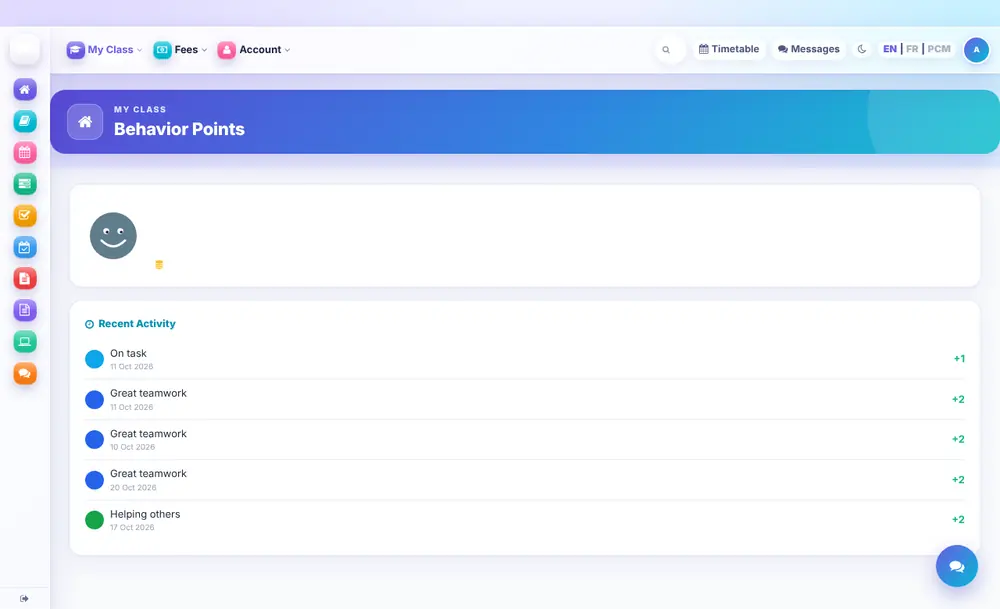
Duba makin da ɗanka yake samu, da dalilin kowanne.
Jadawalin darussa
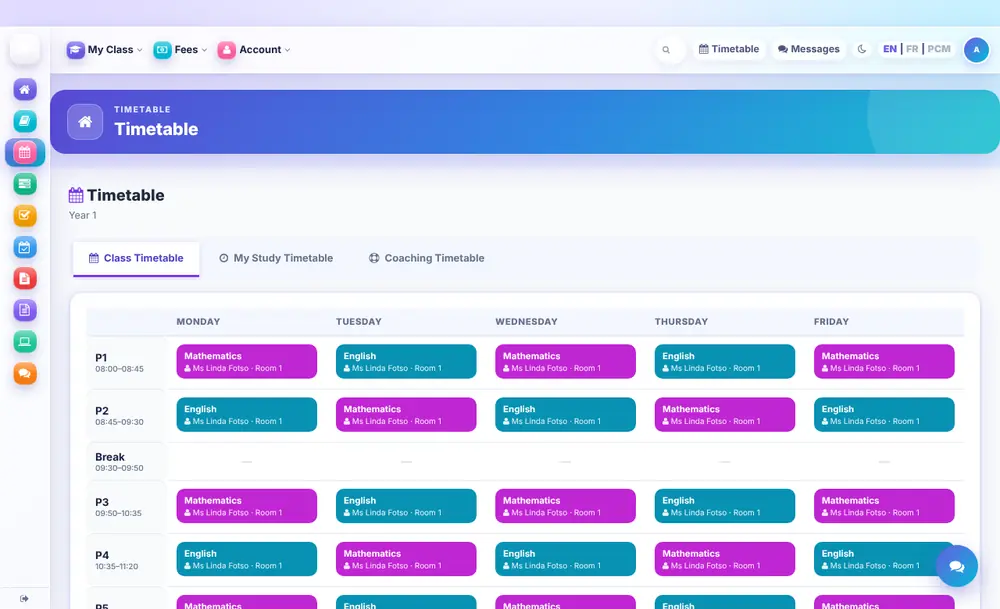
Jadawalin darussan ɗanka na mako, domin ka san abin da zai ɗauka da lokacin.
Ɗalibai
Allon aikina
Halarta, darussa, matsakaicin maki da gajerun hanyoyi zuwa duk abin da ɗalibi yake buƙata.
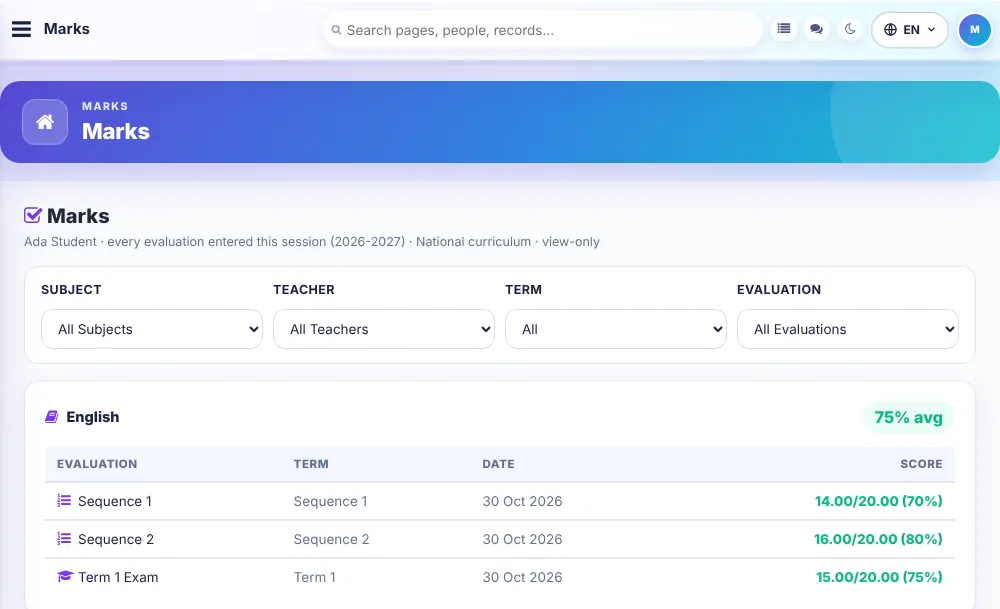
Makinaina
Kowane maki bisa darasi da jarrabawa, ana sabunta shi yayin da malamai ke shigar da maki.
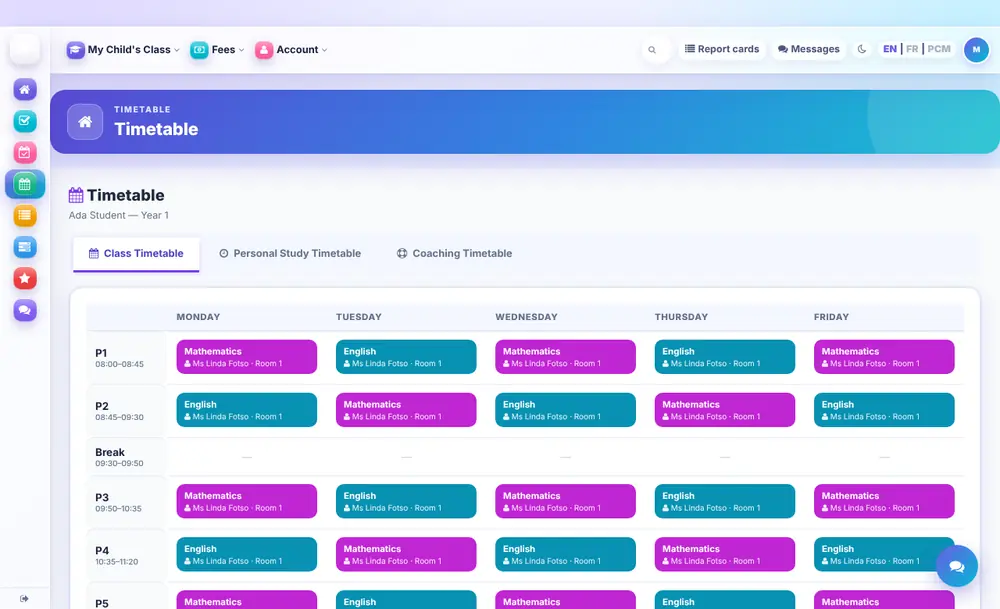
Jadawalin darussana
Makonka a taƙaice: darasi, malami da ɗaki na kowane lokacin darasi.
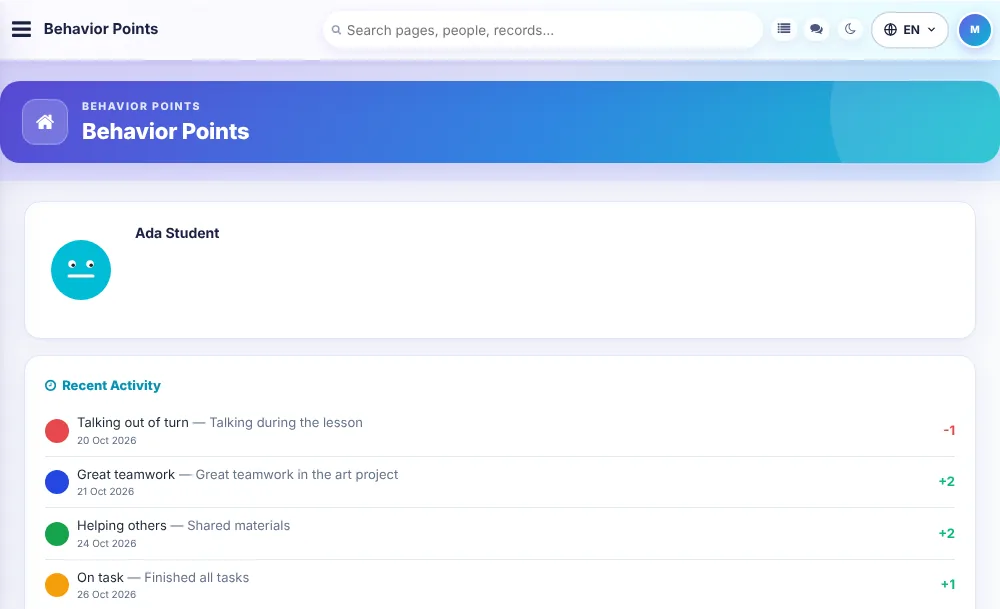
Makin ɗabi'ata
Duba makin da kake samu saboda kyakkyawar ɗabi'a da dalilin su.
Baƙi
Gwada shi da makarantarka
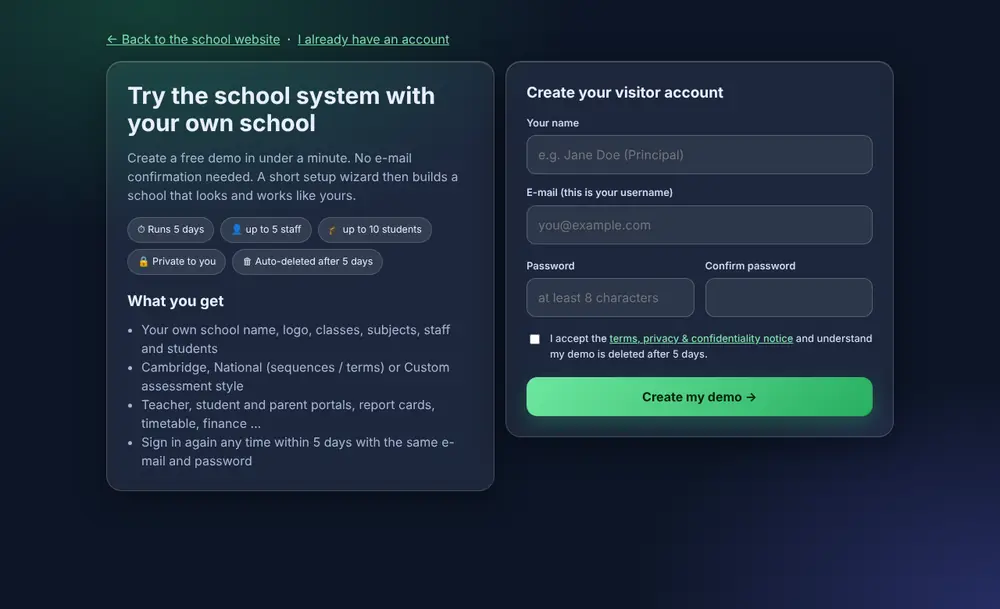
Ƙirƙiri asusun baƙo kyauta cikin ƙasa da minti ɗaya ka kafa makarantar gwaji yadda taka take aiki. Ana share ta kai tsaye bayan ƴan kwanaki.
Shafin intanet na kowace makaranta
Kowace makaranta tana samun shafinta na intanet na jama'a tare da labarai, abubuwan da suka faru, hotuna da shigar ɗalibai, ba tare da haɗuwa da sauran makarantu ba.
Shiga ɗaya ga kowa
Masu gudanarwa, malamai, ɗalibai da iyaye suna shiga daga shafi ɗaya, da Turanci, Faransanci ko Pidgin.
Da ƙari, an haɗa a ciki
Ana kuma haɗa waɗannan. Nemi nunin gwaji don ganin suna aiki.
Mai sarrafa ayyuka
Allunan ayyuka da wa'adi na ayyukan ma'aikata da kwamitoci.
Littafin ma'aikata
Ƙa'idoji da littattafan jagora da aka rubuta sau ɗaya kuma kowa zai iya bincika.
Zazzagewa da kayan karatu
Raba bayanai da fayiloli da aji daga wuri ɗaya.
Tarihin ayyuka da ajiyar bayanai
Duba wanda ya canza me, ka ajiye kwafin bayananka lafiya.
Yana aiki a kowace waya
Ana iya sanya shi kamar manhaja, tare da aiki ba tare da intanet ba don haɗin intanet mai jinkiri.
Shafukan da ke sama misalai ne. Wannan shi ne duk abin da ObadX yake yi a yau, bisa wanda ke amfani da shi: 343 fasaloli a cikin 34 fannoni.
School leadership and administration
Principals, administrators and heads of section: everything needed to run the school from one place.
Students and admissions 25
Online admission formFamilies apply from the school website; applications arrive in a queue you can review and accept.
Admission form for staffEnter a new student in minutes, with parent details, class and photo.
Admission enquiriesLog every enquiry by category and follow it until it becomes a student or is closed.
Pending admissionsSee who has applied but is not yet enrolled, so nobody falls through the cracks.
Bulk import from a spreadsheetLoad a whole class or a whole school from a CSV file instead of typing every record.
Student profile and detailsOne record for each student: personal details, guardians, class, house, club, health and documents.
Profile extrasExtra fields and notes on a student for whatever your school needs to remember.
Advanced searchFind any student by name, class, status, house, guardian or other details in seconds.
Student status (never deleted)Mark students active or inactive; old records stay searchable forever but leave class lists and reports.
Promote to the next classMove a class up at the end of the year in one step.
Change a student's classMove one student between classes without losing their history.
Student timelineOne page per student showing what happened and when, across the whole school.
Digital progress trackingAcademic trend, logbook, behaviour points and attendance combined into one picture of the student.
Academic transcriptPrint a cumulative transcript for any student, for one year or for a selection of years.
Student documentsUpload letters, certificates and IDs for a student or a whole class and share them with families.
Student portfolioAchievements, awards, leadership roles and projects collected for each student.
Alumni recordsKeep former students on record and in touch with the school.
Printed and QR ID cardsDesign student ID cards with a QR code and print a whole class at once.
Student e-walletA wallet balance for each student that staff can top up or deduct from, with a record of every change.
Student auto-login for supportOpen the app exactly as a student sees it to help with a problem.
IEP records and reportsIndividual education plans for students who need extra support, with progress reports.
Takardun shaidaDesign a certificate once with your school name and colours, then create and print it for any student.
Subject managementAdd subjects with codes and coefficients and decide which classes study them.
Subject enrolmentCompulsory subjects are assigned automatically; optional subjects are enrolled student by student.
Performance and career forecastsOptional forecasts of likely, best-case and worst-case results per subject, and career suggestions.
Halarta 12
Daily student attendanceMark a class present or absent in a few taps from any phone.
Period (subject) attendanceRecord attendance period by period, not just once a day.
Morning and afternoon registersHomeroom teachers mark AM and PM attendance for their class.
QR code attendanceScan student QR cards to mark them present instantly.
Late arrivalsLog students who come late, with the minutes and the reason.
Excuse managementParents or students submit an excuse; you approve or reject it.
Parent notificationsParents hear about an absence the same day.
Monthly register and calendarA full month-by-day attendance grid for any class, plus a calendar view.
Attendance by sectionHeads of section see attendance for their own part of the school.
Attendance reports and summariesRates by class, student and period, ready to print or export.
Attendance analyticsTrends and patterns that show where attendance is slipping.
Attendance settingsDefine the attendance periods and thresholds your school uses.
Exams, marks and report cards 26
Exams overviewEverything about the school's exams and assessments on one dashboard.
One place to enter marksA single mark-entry page for the whole school, adapted to Cambridge or national grading.
Co-teacher marksWhere two teachers share a subject, each enters marks alone and the system adds them. The head of department and homeroom teacher see each part.
Voice entryMarks and attendance can be spoken instead of typed, in English, French or Pidgin. You can switch it off for your school.
Entry deadlinesOpen and close mark entry per assessment; teachers can only enter marks inside the window and you can reopen it.
Lock managementLock finished marks so they cannot be changed by accident.
Assessment weights and periodsSet the weight of homework, tests, projects and exams, and the terms or sequences they belong to.
Grading schemesChoose and edit the grading scale used for each year group, with the pass mark.
Katunan sakamako da ke fitowa daidaiReport card templates for primary, secondary and nursery, printed one by one or for the whole class.
Publish gateStudents and parents can open a report card only after you publish it, and can save it as a PDF.
Report cards by e-mailSend each parent their child's report card as a PDF, queued so large classes never time out.
Report card comments and conductHomeroom teachers add conduct and comments; subject teachers add effort marks and skills.
Cambridge and international report cardsTrimester report cards for Cambridge-style schools.
National (Cameroon) reportsTerm and annual averages, coefficient reports, pass/fail lists, class council reports and class mark sheets.
Class mark sheetsThe full class result on one sheet, ready to print.
Assessment sheetPer-subject marks with automatic weighted totals, term summaries and a grade overview.
Evaluation logbookTeachers record each evaluation; you see class summaries, recommendations and publish marks by term.
Seating plansArrange exam rooms and seat students automatically.
Exam analytics and school statisticsPass rates, class averages and subject spreads straight from the marks.
Teacher logbook oversightSee what each teacher has recorded and when.
Online markingScan, anonymise, share and mark exam scripts on screen.
Internal examsPlan and manage the school's own exams and mock exams.
Exam paper workflowPapers move from the teacher to the head of department, head of section and curriculum review before printing.
Marking schemes and moderationAttach marking schemes to papers and moderate marks before they are released.
Print queue and paper libraryApproved papers wait in a print queue and are archived in a searchable library.
Grade overview and term summariesSee the grade spread and the progress of every student term by term.
Cambridge department 12
Cambridge coordinator dashboardThe coordinator's overview of sessions, candidates and deadlines.
Exam sessions and subjectsSet up each Cambridge series and the subjects entered.
Candidates and candidate numbersRegister candidates and keep their numbers together.
Predicted gradesRecord predicted grades for every candidate and subject.
CourseworkTrack coursework and its submission for the exam board.
Exam timetableThe Cambridge exam timetable for your candidates.
Special considerationPrepare special consideration requests with their details.
Results and results analysisEnter results and analyse them by subject, class and candidate.
DeadlinesNever miss an entry or submission date.
Tools and exportsExport what the exam board asks for.
TranscriptsPrint transcripts for IGCSE, AS and A Level students.
Cambridge team membersGive each member of the Cambridge team the access they need.
Jadawalin darussa 15
Bell and period scheduleDefine the school day: periods, breaks and lengths.
Room managementList rooms and their capacity, and book them without double-booking.
Teacher availabilityBlock the times a teacher cannot teach before building the timetable.
Timetable builderBuild the week by dragging lessons onto the grid.
Clash detectionTeachers, rooms and classes that are double-booked are flagged before the term starts.
Automatic generationLet ObadX build a first timetable that respects your rules, then adjust it.
ConstraintsSet your scheduling rules once and have them respected every time.
TemplatesSave a timetable as a template and reuse it for the next term.
Timetables by class, teacher, room and departmentPrint or view the timetable from every angle, plus a master view of the whole school.
SubstitutesCover an absent teacher's lessons and tell everyone affected.
Timetable typesSeparate timetables for normal terms, exams, mocks and holiday classes.
Timetable committeeGive committee members access to edit only what they should.
Timetable reports and analyticsTeaching load, free periods and room use at a glance.
Audit logSee who changed which lesson and when.
Print and PDFPrint-ready timetables for notice boards and files.
Fees and finance 13
Finance dashboardBilled, collected, outstanding and spending on one live page.
Fee types and invoicesCreate tuition, transport, uniform and other fees, and invoice a class or the whole school.
Manage invoicesSearch, edit and follow every invoice and its status.
Payments and receiptsRecord cash and mobile-money payments and print a receipt.
Mobile money requestsFamilies say they have paid by MTN or Orange; the finance office confirms it and the invoice updates.
Payment historyEvery payment on every invoice, with who recorded it.
Student ledgersA full account statement for each student.
Expenses and categoriesRecord what the school spends, grouped in categories you define.
General ledgerThe school's books in one ledger, fed by fees and expenses.
Financial reportsIncome, expenses and outstanding balances by period.
Salary disbursementPay staff from approved payslips and keep the record.
Finance settings and payment methodsChoose how families may pay and what each method says.
Staff savings circle (njangi)Run a staff savings group with several slots per member.
Staff and HR 23
HR overviewHeadcount, leave, vacancies and staff data on one page.
DepartmentsOrganise staff into departments with their heads.
Employee directoryOne directory for teaching and non-teaching staff, with login accounts and roles.
RecruitmentPublish vacancies and handle applications.
ContractsStore each staff contract and its dates.
Leave managementStaff request leave, managers approve it, and a leave calendar shows who is away.
PayrollSalary grades, payslip components, payslip generation, approval and a history of every payslip.
Part-time sessionsPay part-time teachers for the sessions they actually take.
LoansRecord staff loans with their amount, duration and dates.
Disciplinary recordsKeep a confidential disciplinary history for staff.
Performance appraisalRun appraisals with scores and comments.
HR analyticsStaffing, leave and payroll numbers you can act on.
Teacher-subject-class assignmentsDecide who teaches what to whom; it drives mark entry, timetables and report cards.
Staff awardsRecognise staff achievements.
Staff attendanceDaily check-in with QR codes or GPS geofencing, late arrival tracking and a check-in dashboard.
GPS check-inStaff check in only when they are actually at the school.
Substitution triggersAbsent teachers who need cover are flagged automatically.
Classroom presenceConfirm that the teacher really showed up, by QR scan, a printed booklet or class delegates.
Class delegatesStudents confirm whether the scheduled teacher came, as a cross-check.
Presence conflictsMismatches between what teachers and delegates report are raised for review.
Staff coaching programPair experienced teachers with colleagues for guided coaching.
Student coachingAssign teachers as coaches to individual students.
Parents directoryOne list of every parent linked to students.
Communication 13
ChatDirect messages between staff, and with parents and students where allowed.
Group messagingMessage a class, a department or any group.
Announcements and notice boardPost a notice for everyone or only for parents, with an expiry date.
E-mail and SMSSend e-mail and SMS to parents and staff using your own provider.
Bulk messagesReach a whole class, section or school in one send.
Message templatesReusable messages for common situations.
CircularsIssue and track official circulars.
Reviewed messages to parentsTeacher messages pass through an approval chain before they reach parents.
Communication audit logA record of what was sent, to whom and when.
Parent observationsParents send testimonies, requests and complaints and read your replies.
Escalated requestsRequests a teacher could not resolve reach the administration for action.
Communications hubControl who may message whom, with analytics.
Contextual chatsChat from any mark or attendance day. You choose if teacher messages to parents go direct or need approval, and you can read every one.
Behaviour and student support 19
Makin ɗabi'aReward and record behaviour with points, badges and categories.
Class and school leaderboardsA friendly leaderboard that keeps students motivated.
Rewards storeSet up rewards that students can redeem with their points.
Class and school story feedShare moments from the classroom with families.
Teacher toolkitQuick tools for awarding points during a lesson.
Parent summariesA readable behaviour summary for each family.
Staff shout-outsColleagues thank each other publicly.
IncidentsLog and assign behaviour incidents.
Counselling cases (CSSD)Case managers, student cases and individual education plans for the counselling team.
Wellbeing trackerTrack student mood and wellbeing over time.
Clinic health profilesAllergies, conditions and emergency contacts for each student.
Clinic visit logRecord every visit, including bulk entry on busy days.
Medication inventory and dispensingStock levels and every dose given.
Chronic condition alertsStaff are alerted to students with serious conditions.
Immunisation recordsKeep vaccination records in one place.
Referrals and appointmentsRefer students to outside care and schedule visits.
Incident reports and health complaintsDocument accidents and complaints.
Staff healthA confidential health log for staff.
Clinic reports and wellbeing analyticsTrends for the nurse and the leadership.
Learning and teaching resources 16
Online hubCourses, enrolments, progress, a gradebook, assignments, discussions and certificates in one place.
Google Classroom linkConnect your classes with Google Classroom using your school's Google account.
Darussa kai tsayeSchedule lessons on Zoom or Jitsi with the link in one place for students and parents.
Video classroomTeach by video from inside the platform.
Computer-based testsTimed exams with multiple choice, true/false and fill-in questions, marked automatically.
Aikin gidaSet homework by class and subject and follow submissions, overdue work and the submit rate.
Shirin darasiTeachers submit lesson plans that move through review to approval.
SyllabusKeep the academic syllabus for each class and subject.
Resource centerShare notes and files by class, with categories and a download portal for students.
Google Drive linkShare Drive files without storing them on the school's system.
Material requestsTeachers request teaching materials; the school reviews and approves.
Digital library (Smart Library)A catalogue of books, videos and websites with reading levels, shared by link.
Reading tracker and competitionsTrack reading, award badges and run reading competitions.
Reading quizzesQuizzes that check what a student has read.
Library managementBooks, authors, publishers, categories, requests and student library registration.
Littafin ma'aikataƘa'idoji da littattafan jagora da aka rubuta sau ɗaya kuma kowa zai iya bincika.
Recognition and school culture 9
AwardsCategories, nominations, criteria, an award wall and a history of every award.
Automatic awardsStudents and staff who meet your criteria are found for you.
Award leaderboard and analyticsSee who is excelling and where.
Teacher portfoliosA profile for each teacher with achievements and recognition.
Teacher recognition engineScore teachers on weights you set and recognise the best.
Student portfoliosAchievements and growth collected for each student.
Role models and simulationsStudents explore role models and practise decisions in guided scenarios.
Challenges and badgesMentorship challenges that earn badges.
Gaming centerEducational games and tournaments, with access you control.
Facilities and operations 11
Gidan kwanan ɗalibaiHostel blocks, rooms, beds and the cost per bed.
TransportationRoutes, vehicles and drivers with each run and its fare.
InventorySuppliers, items, sales, procurement and lending, with reports.
AssetsKayan daki da kayan aiki tare da lambar jeri, yanayi da wanda ke riƙe da su.
CanteenDaily menus, an order and payment screen, wallets, stock and meal requests.
Canteen salary deductionStaff meals paid by salary deduction, itemised on the payslip.
ReceptionA visitor book, a phone call log, complaints, postal dispatch and receipt, and surveys.
Tikitin tallafiParents and staff raise a request and follow it until it is resolved.
Mai sarrafa ayyukaKanban boards, Gantt charts, projects, workload and time reports for staff projects.
CommitteesCommittees with tasks, meetings, budgets and analytics.
Office workspaceYour own files, templates and a toolkit for converting and compressing documents.
Insight and control 13
Executive dashboardEvery key number for the principal on one screen.
AnalyticsAcademic, attendance, student, teacher, financial, behaviour, clinic and learning analytics.
Custom report builderBuild and export your own report from any part of the platform.
Role dashboardsBuild the dashboard each role sees, with widgets and quick links.
Roles and permissionsDecide who can see and do what, down to a single person.
Section heads and class teachersAssign heads of section and class teachers with the access they need.
Signatures and stampsUpload signatures once and print them on report cards, payslips and certificates.
Audit trailA record of who did what, and when.
View as a userAdministrators can see the system as a teacher, student or parent, with every action recorded.
Session timeoutChoose how long a signed-in person can stay idle.
Credentials managementReset or manage the sign-in details of users.
Global searchSearch students, staff, pages and settings from one box.
AI assistantAsk a question and get answers limited to what your account may see.
Setup and settings 12
School setupName, contact, logo, academic year, time zone, school type and results rules.
School typeCambridge, national or custom; the system adapts its terms, grading and report cards.
Academic structure and terminologyName your own sections, classes, terms and sequences.
Calendar, terms and holidaysDefine the school year and the days you are closed.
Student categories, houses and clubsGroup students the way your school does.
Report card templatePick and preview the report card design.
E-mail and SMS settingsConnect your own sender and edit the message templates.
IntegrationsPayments, e-mail, SMS and live classes configured in one place.
LanguagesSwitch the system between English, French and Cameroonian Pidgin.
Security and sessionsSign-in rules, two-step sign-in and session settings.
BackupDownload a backup of your school's data.
Website managerEdit your school's public website and its search-engine details.
School website 7
Banner and home pageEdit the banner and welcome content of your public website.
About and campusTell your story and show your campus.
Admission procedurePublish how to apply, with the steps and the dates.
Website enquiriesMessages from visitors land in a list you can answer.
School newsPublish news posts for families and the community.
GalleriesPhoto galleries of events and school life.
Allon sanarwaA public notice board with expiry dates.
Malamai
Everything a teacher needs for the day, on a phone or a computer, and nothing they should not see.
Your classes and your day 8
Teacher dashboardAzuzuwanka, ɗalibai, darussa da halartar yau a shafi ɗaya, tare da gajerun hanyoyi zuwa abin da kake yi mafi yawa.
Your own timetableMakonka a taƙaice: aji, darasi da ɗaki na kowane lokacin darasi.
Only your classes and subjectsYou see only the classes and subjects you are assigned to.
Student progress trackingAcademic, behaviour and attendance trends for your homeroom and the classes you teach.
Subject recommendationsRecommendations for the subjects and classes you teach.
My tasksTasks assigned to you in the task manager appear on your own page.
CommunicationMessage colleagues, parents and students from inside the platform.
My profileKeep your details, photo and signature up to date.
Halarta 8
Mark attendanceTake attendance for your homeroom or subject classes in a few taps.
Voice attendanceSay present, absent or late instead of tapping, in English, French or Pidgin. Nothing is recorded and you check before saving.
Classroom presenceConfirm you are in the room for your period with a QR scan or a check-in.
Attendance reportsSee the attendance record of your classes and print it.
My own attendanceSee your own check-ins and presence record.
Presence alertsGet an alert when a teacher has not signed in to a class.
Homeroom teacher presenceSee which teachers passed through your homeroom class.
Staff check-inCheck in at school with the method your school uses (QR code or GPS).
Marks, exams and report cards 11
Shigar da makiEnter marks step by step for your class, subject and evaluation; the page copes with a weak connection.
Voice mark entryTap the microphone and call out each mark. It fills the sheet in English, French or Pidgin, and you check it before saving. Nothing is recorded.
Talk about a markTap a mark or attendance value to chat about it with the homeroom teacher, heads, administration, parent, student, mentor or the AI.
Shared subjectsWhen a subject has a co-teacher, each of you enters your own marks and the system adds them together. You cannot see each other's marks.
Entry windowsYou can enter marks only while the school has opened the evaluation, so deadlines are clear.
Jarrabawa ta intanetSet timed multiple-choice exams and see the results.
Online markingMark scanned scripts on screen, with candidates shown only by code.
Katunan sakamakoOpen the report cards of your classes.
Report card commentsWrite conduct and comments for your homeroom class, and effort marks for your subject.
Shirin darasiRubuta shirin darasi ka bi matsayin amincewarsa daga shafinka.
Evaluation logbookRecord each evaluation as you go.
Teaching resources 6
MaterialsKeep personal documents, class resources and department files in one place, and share them by link.
Material requestsAsk the school for the materials you need and follow the answer.
Online hubCourses, assignments and discussions for your classes.
Live sessionsSchedule and teach live lessons online.
Aikin gidaSet homework and follow who has handed it in.
CanteenSee the daily canteen menu and order.
Behaviour and care 4
Makin ɗabi'aAward points and badges to students for good behaviour, during the lesson.
Student requestsRequests from your students reach you, and you can escalate what you cannot solve.
Recreational centerEducational games the school assigns to you.
TournamentsTake part in school game tournaments.
Your work as a staff member 4
PayslipsSee and download your payslips.
Leave applicationAsk for leave and follow the answer.
My awardsSee the awards you have received.
My coachingSee who coaches you and who you coach, set your weekly meeting and keep session notes.
Ɗalibai
A simple place to see your marks, timetable, homework and progress, made for a phone.
Your school life 6
Student dashboardAttendance, subjects, average and quick links to everything you need.
Your subjects and teachersSee your subjects and who teaches them.
Class matesSee the students in your class.
Jadawalin darussaYour week: subject, teacher and room for every period.
HalartaYour own attendance record.
CommunicationMessages from your school.
Marks and learning 7
Your marksKowane maki bisa darasi da jarrabawa, ana sabunta shi yayin da malamai ke shigar da maki.
Ask about your marksTap a mark, an attendance day or a subject to ask your teacher, head of department or the AI assistant about it, with that value attached.
Katin sakamakoOpen and save your report card once the school has published it.
AssignmentsSee homework and assignments and hand in your work as a file.
Study materialNotes and files from your teachers.
Jarrabawa ta intanetTake timed exams on screen and see what you have completed.
Video classroomJoin live lessons by video.
Behaviour, rewards and fun 4
Makin ɗabi'aSee the points you earn and what they were for.
Recreational centerEducational games your school assigns to you.
Class delegateIf you are chosen as a delegate, confirm whether the scheduled teacher came to class.
My coachingSee your coach, your weekly meeting and the notes from your sessions.
Fees and account 4
InvoicesSee what is due.
Payment historySee what has been paid.
My requestsAsk the school for something and follow the answer.
Manage profileKeep your details up to date and change your password.
Parents and guardians
Know how your child is doing, all year, without waiting for report day.
Your child 11
DashboardHalarta, darussa, matsakaicin maki da kuɗin da ake bi, da zarar ka shiga.
Several children, one sign-inSwitch between your children from the same account.
MarksKowace jarrabawa da maki yadda malamai suke shigar da su, saboda kada a samu mamaki a lokacin katin sakamako.
Poser une question sur une noteTouchez une note, un jour de présence ou une matière pour interroger l’école. La discussion s’ouvre avec cette valeur jointe, personne n’a à préciser laquelle.
Katin sakamakoOpen and save the report card when the school publishes it.
HalartaA clear day-by-day record and overall rate.
Jadawalin darussaYour child's weekly timetable.
Subjects, teachers and class matesWho teaches your child and who is in the class.
Assignments and study materialSee the homework and notes your child is given.
Makin ɗabi'aSee the points your child earns, and the reason for each.
Video classroomFind the links to your child's live lessons.
Fees and communication 7
InvoicesOutstanding invoices with amounts and balances.
Payment historyEvery payment made, with its date.
Pay by mobile moneySay that you have paid by MTN or Orange and the school confirms it.
Messages from the schoolAnnouncements and reviewed messages from teachers, in English, French or Pidgin.
Excuse an absenceTell the school why your child was away.
Submit an observationSend a testimony, a request or a complaint and read the school's reply.
Manage profileKeep your contact details up to date.
Accountants, librarians, HR, hostel and other staff
Each team member gets a focused workspace with only the tools their job needs.
Accountant and bursar 5
Collect feesRecord a payment against an invoice and print the receipt.
Manage invoicesCreate, edit and follow invoices and balances.
Payment requestsConfirm mobile-money payments families say they have made.
Expenses and categoriesRecord spending and group it in categories.
Leave and awardsApply for leave and see your awards.
Librarian 5
Books, authors, publishers and categoriesKeep the library catalogue in order.
Master dataManage the shared lists the library uses.
Book requestsHandle requests for books.
Student library registrationRegister students as library members.
Leave and awardsApply for leave and see your awards.
HR manager 4
Employee managementAdd and manage teaching and non-teaching staff, accountants, librarians and hostel managers.
DepartmentsOrganise staff into departments.
RecruitmentPublish vacancies and handle applications.
Leave and awardsHandle leave requests and staff awards.
Hostel manager 3
Hostel categories, rooms and bedsManage boarding houses, rooms and beds.
Hostel informationKeep the details of each hostel.
Leave and awardsApply for leave and see your awards.
For every school, whoever is using it
Things that come with ObadX no matter who signs in.
Built for real conditions 7
Works on any phone, tablet or computerPages are light and adapt to the screen, so staff, parents and students can use whatever they have.
Install it like an appAdd ObadX to the home screen of a phone or computer; it opens in its own window.
Keeps working on slow connectionsPages you have opened before keep opening without a connection.
English, French and Cameroonian PidginEveryone can switch the language of the platform.
Light and dark appearanceChoose the look that is easiest on your eyes.
One sign-in page for every roleAdministrators, teachers, students, parents and staff each land on the right dashboard.
Private workspace for each schoolEvery school has its own address and its own separate data.
Safe and accountable 6
Roles and permissionsEach person sees only what their role allows.
Audit trailA record of who did what, and when.
Two-step sign-inOptional extra protection with an authenticator app.
Automatic sign-outIdle sessions end by themselves.
BackupsYour data can be backed up and restored.
Privacy by designYour students' records are never used for advertising and never shared with other schools.
Help and growth 7
AI assistantAsk a question inside the platform and get an answer limited to what your account may see.
Global searchFind people, pages and settings from one search box.
Printing and PDFReports, report cards, timetables and certificates print cleanly and save as PDF.
Spreadsheet import and exportBring records in from a spreadsheet and take reports out.
Your school's public websiteNews, events, gallery, admissions and a notice board on a website of your own.
Free visitor demoTry a sample school with sample data before you decide.
Training and onboardingThe team helps you set up, import your data and train your staff.
Sababbin fasaloli suna zuwa kullum. Nemi nunin gwaji don ganin suna aiki, ko ka tambayi mataimakin a ƙasan shafin. Nemi nunin gwaji →
 ObadX